Event-Driven Component Network (ECN)
- Published on
Part of Building Composable Systems. For the full frontend reading path, start with Part II: Composable Frontend Architecture.
The customer adds an item to the cart. The product panel updates, but the basket count in the header does not. Someone fixes it by importing the header store into the product panel. Later, the same panel appears in an embedded storefront that has no header store.
The immediate bug is gone. The dependency has moved into the feature.
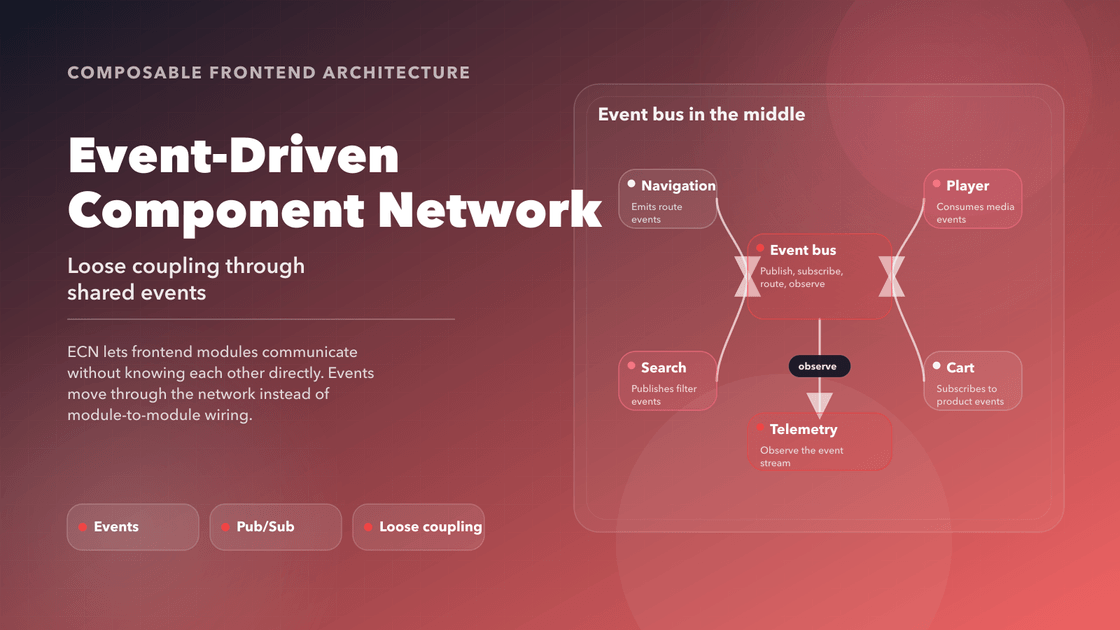
Events offer another boundary: the cart workflow can report that the cart changed, and interested modules can respond without the workflow knowing their implementation. That is the purpose of the Event-Driven Component Network (ECN) in this architecture.
The useful part is the agreement about the message. A bus only delivers it.
Why We Need ECN
Modern frontends are composed of distributed and independently deployed components. These components may:
- Reside in different micro frontends that load at different times
- Be rendered on the server or at the edge and hydrated later on the client
- Use different frameworks or rendering models (React, Web Components, etc.)
Without a consistent, event-driven layer, developers resort to fragile workarounds:
- Prop drilling across component trees
- Global singletons that create tight coupling
- Cross-frame messaging that is brittle and error-prone
ECN solves these problems by providing a robust, consistent messaging fabric:
- Loosely coupled interaction: Components emit and subscribe to events without knowing who listens or who broadcasts.
- Asynchronous message handling: Supports real-time updates, background synchronization, and deferred UI state changes.
- Decoupled coordination: Enable communication across system boundaries (e.g., between host shell and plugins).
📘 Related: ECN patterns are inspired by pub-sub systems, Flux/Redux architecture, and WebSocket-style event streams.
Historical Context and Prior Art
Flux and Redux
Introduced the concept of centralized state and unidirectional data flow, but rely on global stores that couple all views tightly.
EventEmitter and Pub/Sub APIs
Popular in Node.js and vanilla JS, but often lack structured typing and integration with reactive UI rendering systems.
Microfrontend Communication
Most real-world MFE systems suffer from hardcoded communication bridges. ECN builds an intentional message network across distributed components.
Actor Model and Serverless Triggers
Emerging cloud-native patterns show the benefits of event-based logic. ECN brings this to the frontend, enabling edge-driven reactivity.
Architecture Overview
The Event-Driven Component Network (ECN) introduces a decoupled, reactive communication layer that binds together independently rendered parts of an application. Unlike global state solutions or prop drilling, ECN allows components to be self-contained and asynchronous while still collaborating in real-time.
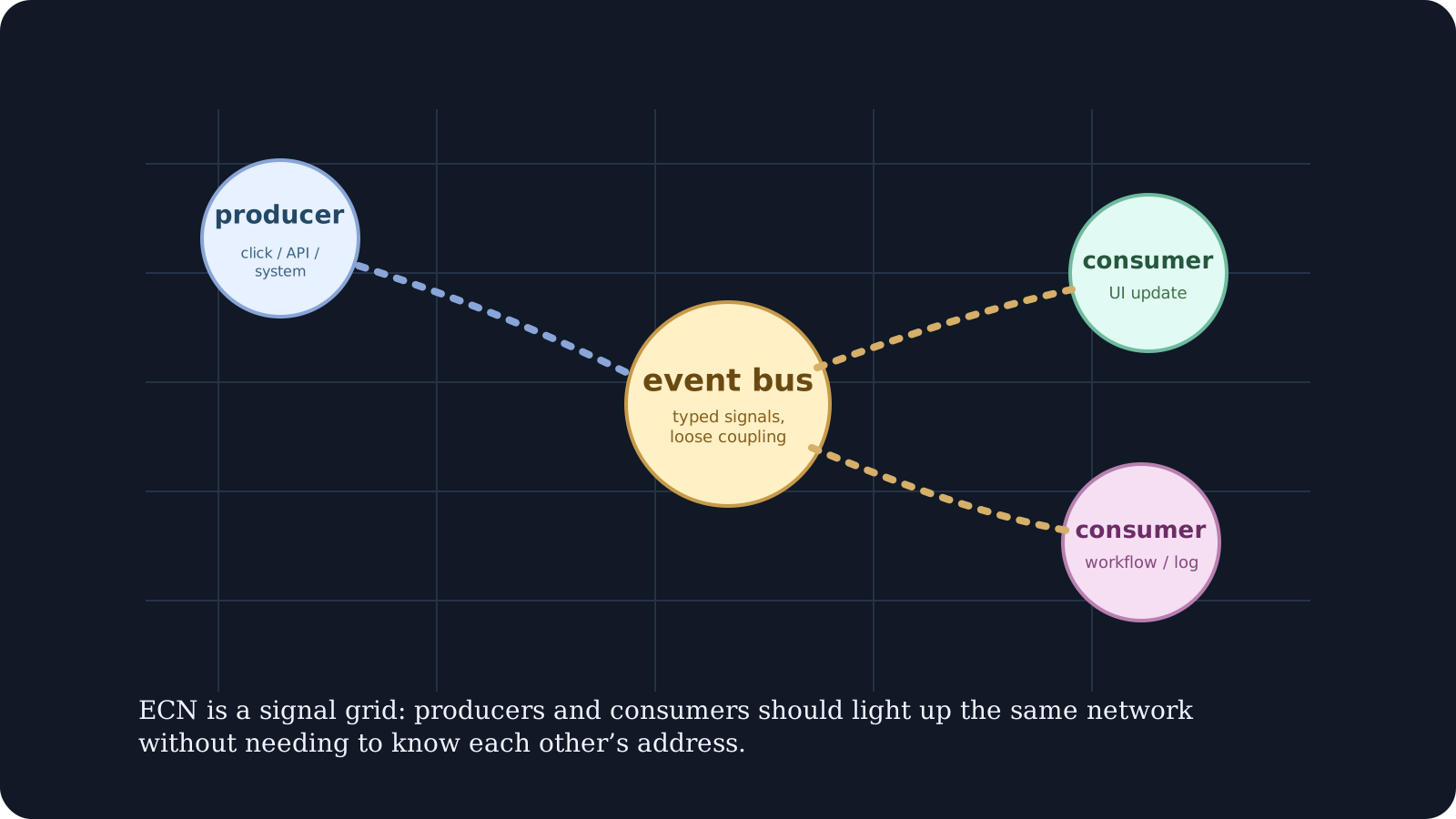
It is composed of three core architectural layers:
Event Producers: These are the initiators of interaction—user inputs, services, API responses, or internal workflows. They emit structured events when a significant change occurs.
ECN Event Bus / Message Broker: This is the dispatch center. It routes messages to subscribed listeners. It can be in-memory (for small apps) or distributed (for micro frontends, multi-device, or remote runtimes).
Event Consumers: These are listeners that react to dispatched events. Consumers may update UI, start workflows, or trigger downstream effects.
This triad enables a scalable system where UIs, logic engines, and state models work together without coupling tightly.
Example flow:
%3b%7d%23mermaid-0 .error-text%7bfill:rgb(0%2c 0%2c 0)%3bstroke:rgb(0%2c 0%2c 0)%3b%7d%23mermaid-0 .edge-thickness-normal%7bstroke-width:1px%3b%7d%23mermaid-0 .edge-thickness-thick%7bstroke-width:3.5px%3b%7d%23mermaid-0 .edge-pattern-solid%7bstroke-dasharray:0%3b%7d%23mermaid-0 .edge-thickness-invisible%7bstroke-width:0%3bfill:none%3b%7d%23mermaid-0 .edge-pattern-dashed%7bstroke-dasharray:3%3b%7d%23mermaid-0 .edge-pattern-dotted%7bstroke-dasharray:2%3b%7d%23mermaid-0 .marker%7bfill:%23666666%3bstroke:%23666666%3b%7d%23mermaid-0 .marker.cross%7bstroke:%23666666%3b%7d%23mermaid-0 svg%7bfont-family:system-ui%2c-apple-system%2csans-serif%3bfont-size:16px%3b%7d%23mermaid-0 p%7bmargin:0%3b%7d%23mermaid-0 .label%7bfont-family:system-ui%2c-apple-system%2csans-serif%3bcolor:black%3b%7d%23mermaid-0 .cluster-label text%7bfill:rgb(0%2c 0%2c 0)%3b%7d%23mermaid-0 .cluster-label span%7bcolor:rgb(0%2c 0%2c 0)%3b%7d%23mermaid-0 .cluster-label span p%7bbackground-color:transparent%3b%7d%23mermaid-0 .label text%2c%23mermaid-0 span%7bfill:black%3bcolor:black%3b%7d%23mermaid-0 .node rect%2c%23mermaid-0 .node circle%2c%23mermaid-0 .node ellipse%2c%23mermaid-0 .node polygon%2c%23mermaid-0 .node path%7bfill:white%3bstroke:%23cccccc%3bstroke-width:1px%3b%7d%23mermaid-0 .rough-node .label text%2c%23mermaid-0 .node .label text%2c%23mermaid-0 .image-shape .label%2c%23mermaid-0 .icon-shape .label%7btext-anchor:middle%3b%7d%23mermaid-0 .node .katex path%7bfill:black%3bstroke:black%3bstroke-width:1px%3b%7d%23mermaid-0 .rough-node .label%2c%23mermaid-0 .node .label%2c%23mermaid-0 .image-shape .label%2c%23mermaid-0 .icon-shape .label%7btext-align:center%3b%7d%23mermaid-0 .node.clickable%7bcursor:pointer%3b%7d%23mermaid-0 .root .anchor path%7bfill:%23666666!important%3bstroke-width:0%3bstroke:%23666666%3b%7d%23mermaid-0 .arrowheadPath%7bfill:%230b0b0b%3b%7d%23mermaid-0 .edgePath .path%7bstroke:%23666666%3bstroke-width:2.0px%3b%7d%23mermaid-0 .flowchart-link%7bstroke:%23666666%3bfill:none%3b%7d%23mermaid-0 .edgeLabel%7bbackground-color:hsl(-120%2c 0%25%2c 100%25)%3btext-align:center%3b%7d%23mermaid-0 .edgeLabel p%7bbackground-color:hsl(-120%2c 0%25%2c 100%25)%3b%7d%23mermaid-0 .edgeLabel rect%7bopacity:0.5%3bbackground-color:hsl(-120%2c 0%25%2c 100%25)%3bfill:hsl(-120%2c 0%25%2c 100%25)%3b%7d%23mermaid-0 .labelBkg%7bbackground-color:rgba(255%2c 255%2c 255%2c 0.5)%3b%7d%23mermaid-0 .cluster rect%7bfill:white%3bstroke:hsl(180%2c 0%25%2c 90%25)%3bstroke-width:1px%3b%7d%23mermaid-0 .cluster text%7bfill:rgb(0%2c 0%2c 0)%3b%7d%23mermaid-0 .cluster span%7bcolor:rgb(0%2c 0%2c 0)%3b%7d%23mermaid-0 div.mermaidTooltip%7bposition:absolute%3btext-align:center%3bmax-width:200px%3bpadding:2px%3bfont-family:system-ui%2c-apple-system%2csans-serif%3bfont-size:12px%3bbackground:hsl(180%2c 0%25%2c 100%25)%3bborder:1px solid hsl(180%2c 0%25%2c 90%25)%3bborder-radius:2px%3bpointer-events:none%3bz-index:100%3b%7d%23mermaid-0 .flowchartTitleText%7btext-anchor:middle%3bfont-size:18px%3bfill:black%3b%7d%23mermaid-0 rect.text%7bfill:none%3bstroke-width:0%3b%7d%23mermaid-0 .icon-shape%2c%23mermaid-0 .image-shape%7bbackground-color:hsl(-120%2c 0%25%2c 100%25)%3btext-align:center%3b%7d%23mermaid-0 .icon-shape p%2c%23mermaid-0 .image-shape p%7bbackground-color:hsl(-120%2c 0%25%2c 100%25)%3bpadding:2px%3b%7d%23mermaid-0 .icon-shape rect%2c%23mermaid-0 .image-shape rect%7bopacity:0.5%3bbackground-color:hsl(-120%2c 0%25%2c 100%25)%3bfill:hsl(-120%2c 0%25%2c 100%25)%3b%7d%23mermaid-0 .label-icon%7bdisplay:inline-block%3bheight:1em%3boverflow:visible%3bvertical-align:-0.125em%3b%7d%23mermaid-0 .node .label-icon path%7bfill:currentColor%3bstroke:revert%3bstroke-width:revert%3b%7d%23mermaid-0 :root%7b--mermaid-font-family:system-ui%2c-apple-system%2csans-serif%3b%7d%3c/style%3e%3cg%3e%3cmarker id='mermaid-0_flowchart-v2-pointEnd' class='marker flowchart-v2' viewBox='0 0 10 10' refX='5' refY='5' markerUnits='userSpaceOnUse' markerWidth='8' markerHeight='8' orient='auto'%3e%3cpath d='M 0 0 L 10 5 L 0 10 z' class='arrowMarkerPath' style='stroke-width: 1%3b stroke-dasharray: 1%2c 0%3b'/%3e%3c/marker%3e%3cmarker id='mermaid-0_flowchart-v2-pointStart' class='marker flowchart-v2' viewBox='0 0 10 10' refX='4.5' refY='5' markerUnits='userSpaceOnUse' markerWidth='8' markerHeight='8' orient='auto'%3e%3cpath d='M 0 5 L 10 10 L 10 0 z' class='arrowMarkerPath' style='stroke-width: 1%3b stroke-dasharray: 1%2c 0%3b'/%3e%3c/marker%3e%3cmarker id='mermaid-0_flowchart-v2-circleEnd' class='marker flowchart-v2' viewBox='0 0 10 10' refX='11' refY='5' markerUnits='userSpaceOnUse' markerWidth='11' markerHeight='11' orient='auto'%3e%3ccircle cx='5' cy='5' r='5' class='arrowMarkerPath' style='stroke-width: 1%3b stroke-dasharray: 1%2c 0%3b'/%3e%3c/marker%3e%3cmarker id='mermaid-0_flowchart-v2-circleStart' class='marker flowchart-v2' viewBox='0 0 10 10' refX='-1' refY='5' markerUnits='userSpaceOnUse' markerWidth='11' markerHeight='11' orient='auto'%3e%3ccircle cx='5' cy='5' r='5' class='arrowMarkerPath' style='stroke-width: 1%3b stroke-dasharray: 1%2c 0%3b'/%3e%3c/marker%3e%3cmarker id='mermaid-0_flowchart-v2-crossEnd' class='marker cross flowchart-v2' viewBox='0 0 11 11' refX='12' refY='5.2' markerUnits='userSpaceOnUse' markerWidth='11' markerHeight='11' orient='auto'%3e%3cpath d='M 1%2c1 l 9%2c9 M 10%2c1 l -9%2c9' class='arrowMarkerPath' style='stroke-width: 2%3b stroke-dasharray: 1%2c 0%3b'/%3e%3c/marker%3e%3cmarker id='mermaid-0_flowchart-v2-crossStart' class='marker cross flowchart-v2' viewBox='0 0 11 11' refX='-1' refY='5.2' markerUnits='userSpaceOnUse' markerWidth='11' markerHeight='11' orient='auto'%3e%3cpath d='M 1%2c1 l 9%2c9 M 10%2c1 l -9%2c9' class='arrowMarkerPath' style='stroke-width: 2%3b stroke-dasharray: 1%2c 0%3b'/%3e%3c/marker%3e%3cg class='root'%3e%3cg class='clusters'/%3e%3cg class='edgePaths'%3e%3cpath d='M146.188%2c116L146.188%2c126C146.188%2c136%2c146.188%2c156%2c146.188%2c175.333C146.188%2c194.667%2c146.188%2c213.333%2c146.188%2c222.667L146.188%2c232' id='L_A_B_0' class=' edge-thickness-normal edge-pattern-solid edge-thickness-normal edge-pattern-solid flowchart-link' style='%3b' data-edge='true' data-et='edge' data-id='L_A_B_0' data-points='W3sieCI6MTQ2LjE4NzUsInkiOjExNn0seyJ4IjoxNDYuMTg3NSwieSI6MTc2fSx7IngiOjE0Ni4xODc1LCJ5IjoyMzZ9XQ==' marker-end='url(%23mermaid-0_flowchart-v2-pointEnd)'/%3e%3cpath d='M146.188%2c344L146.188%2c356.167C146.188%2c368.333%2c146.188%2c392.667%2c146.188%2c416.333C146.188%2c440%2c146.188%2c463%2c146.188%2c474.5L146.188%2c486' id='L_B_C_0' class=' edge-thickness-normal edge-pattern-solid edge-thickness-normal edge-pattern-solid flowchart-link' style='%3b' data-edge='true' data-et='edge' data-id='L_B_C_0' data-points='W3sieCI6MTQ2LjE4NzUsInkiOjM0NH0seyJ4IjoxNDYuMTg3NSwieSI6NDE3fSx7IngiOjE0Ni4xODc1LCJ5Ijo0OTB9XQ==' marker-end='url(%23mermaid-0_flowchart-v2-pointEnd)'/%3e%3cpath d='M146.188%2c598L146.188%2c610.167C146.188%2c622.333%2c146.188%2c646.667%2c146.188%2c670.333C146.188%2c694%2c146.188%2c717%2c146.188%2c728.5L146.188%2c740' id='L_C_D_0' class=' edge-thickness-normal edge-pattern-solid edge-thickness-normal edge-pattern-solid flowchart-link' style='%3b' data-edge='true' data-et='edge' data-id='L_C_D_0' data-points='W3sieCI6MTQ2LjE4NzUsInkiOjU5OH0seyJ4IjoxNDYuMTg3NSwieSI6NjcxfSx7IngiOjE0Ni4xODc1LCJ5Ijo3NDR9XQ==' marker-end='url(%23mermaid-0_flowchart-v2-pointEnd)'/%3e%3cpath d='M146.188%2c852L146.188%2c862C146.188%2c872%2c146.188%2c892%2c146.188%2c911.333C146.188%2c930.667%2c146.188%2c949.333%2c146.188%2c958.667L146.188%2c968' id='L_D_E_0' class=' edge-thickness-normal edge-pattern-solid edge-thickness-normal edge-pattern-solid flowchart-link' style='%3b' data-edge='true' data-et='edge' data-id='L_D_E_0' data-points='W3sieCI6MTQ2LjE4NzUsInkiOjg1Mn0seyJ4IjoxNDYuMTg3NSwieSI6OTEyfSx7IngiOjE0Ni4xODc1LCJ5Ijo5NzJ9XQ==' marker-end='url(%23mermaid-0_flowchart-v2-pointEnd)'/%3e%3c/g%3e%3cg class='edgeLabels'%3e%3cg%3e%3crect class='background' style='stroke: none'/%3e%3c/g%3e%3cg%3e%3crect class='background' style='stroke: none'/%3e%3c/g%3e%3cg class='edgeLabel'%3e%3cg class='label' data-id='L_A_B_0' transform='translate(0%2c 0)'%3e%3ctext y='-10.1'%3e%3ctspan class='text-outer-tspan' x='0' y='-0.1em' dy='1.1em'/%3e%3c/text%3e%3c/g%3e%3c/g%3e%3cg class='edgeLabel' transform='translate(146.1875%2c 417)'%3e%3cg class='label' data-id='L_B_C_0' transform='translate(-22.78125%2c -13)'%3e%3cg%3e%3crect class='background' style='' x='-2' y='-3' width='45.5625' height='26'/%3e%3ctext y='-10.1' style=''%3e%3ctspan class='text-outer-tspan' x='0' y='-0.1em' dy='1.1em'%3e%3ctspan font-style='normal' class='text-inner-tspan' font-weight='normal'%3eemits%3c/tspan%3e%3c/tspan%3e%3c/text%3e%3c/g%3e%3c/g%3e%3c/g%3e%3cg class='edgeLabel' transform='translate(146.1875%2c 671)'%3e%3cg class='label' data-id='L_C_D_0' transform='translate(-31.2734375%2c -13)'%3e%3cg%3e%3crect class='background' style='' x='-2' y='-3' width='62.546875' height='26'/%3e%3ctext y='-10.1' style=''%3e%3ctspan class='text-outer-tspan' x='0' y='-0.1em' dy='1.1em'%3e%3ctspan font-style='normal' class='text-inner-tspan' font-weight='normal'%3edelivers%3c/tspan%3e%3c/tspan%3e%3c/text%3e%3c/g%3e%3c/g%3e%3c/g%3e%3cg class='edgeLabel'%3e%3cg class='label' data-id='L_D_E_0' transform='translate(0%2c 0)'%3e%3ctext y='-10.1'%3e%3ctspan class='text-outer-tspan' x='0' y='-0.1em' dy='1.1em'/%3e%3c/text%3e%3c/g%3e%3c/g%3e%3c/g%3e%3cg class='nodes'%3e%3cg class='node default ' id='flowchart-A-0' transform='translate(146.1875%2c 62)'%3e%3crect class='basic label-container' style='fill:%23ffebee !important' x='-120.84375' y='-54' width='241.6875' height='108'/%3e%3cg class='label' style='' transform='translate(-60.84375%2c -24)'%3e%3crect/%3e%3cforeignObject width='121.6875' height='48'%3e%3cdiv xmlns='http://www.w3.org/1999/xhtml' style='display: table-cell%3b white-space: nowrap%3b line-height: 1.5%3b max-width: 300px%3b text-align: center%3b'%3e%3cspan class='nodeLabel '%3e%3cp%3eUser Interaction%3cbr /%3e(click/form/API)%3c/p%3e%3c/span%3e%3c/div%3e%3c/foreignObject%3e%3c/g%3e%3c/g%3e%3cg class='node default ' id='flowchart-B-1' transform='translate(146.1875%2c 290)'%3e%3crect class='basic label-container' style='fill:%23e8f5e8 !important' x='-138.1875' y='-54' width='276.375' height='108'/%3e%3cg class='label' style='' transform='translate(-78.1875%2c -24)'%3e%3crect/%3e%3cforeignObject width='156.375' height='48'%3e%3cdiv xmlns='http://www.w3.org/1999/xhtml' style='display: table-cell%3b white-space: nowrap%3b line-height: 1.5%3b max-width: 300px%3b text-align: center%3b'%3e%3cspan class='nodeLabel '%3e%3cp%3eEvent Producer%3cbr /%3e(emits: 'user:submit')%3c/p%3e%3c/span%3e%3c/div%3e%3c/foreignObject%3e%3c/g%3e%3c/g%3e%3cg class='node default ' id='flowchart-C-3' transform='translate(146.1875%2c 544)'%3e%3crect class='basic label-container' style='fill:%23e3f2fd !important' x='-137.6484375' y='-54' width='275.296875' height='108'/%3e%3cg class='label' style='' transform='translate(-77.6484375%2c -24)'%3e%3crect/%3e%3cforeignObject width='155.296875' height='48'%3e%3cdiv xmlns='http://www.w3.org/1999/xhtml' style='display: table-cell%3b white-space: nowrap%3b line-height: 1.5%3b max-width: 300px%3b text-align: center%3b'%3e%3cspan class='nodeLabel '%3e%3cp%3eECN Event Bus%3cbr /%3e(pub-sub dispatcher)%3c/p%3e%3c/span%3e%3c/div%3e%3c/foreignObject%3e%3c/g%3e%3c/g%3e%3cg class='node default ' id='flowchart-D-5' transform='translate(146.1875%2c 798)'%3e%3crect class='basic label-container' style='fill:%23f3e5f5 !important' x='-130.484375' y='-54' width='260.96875' height='108'/%3e%3cg class='label' style='' transform='translate(-70.484375%2c -24)'%3e%3crect/%3e%3cforeignObject width='140.96875' height='48'%3e%3cdiv xmlns='http://www.w3.org/1999/xhtml' style='display: table-cell%3b white-space: nowrap%3b line-height: 1.5%3b max-width: 300px%3b text-align: center%3b'%3e%3cspan class='nodeLabel '%3e%3cp%3eEvent Consumer(s)%3cbr /%3e(updates UI/logs)%3c/p%3e%3c/span%3e%3c/div%3e%3c/foreignObject%3e%3c/g%3e%3c/g%3e%3cg class='node default ' id='flowchart-E-7' transform='translate(146.1875%2c 1026)'%3e%3crect class='basic label-container' style='fill:%23fff3e0 !important' x='-101.984375' y='-54' width='203.96875' height='108'/%3e%3cg class='label' style='' transform='translate(-41.984375%2c -24)'%3e%3crect/%3e%3cforeignObject width='83.96875' height='48'%3e%3cdiv xmlns='http://www.w3.org/1999/xhtml' style='display: table-cell%3b white-space: nowrap%3b line-height: 1.5%3b max-width: 300px%3b text-align: center%3b'%3e%3cspan class='nodeLabel '%3e%3cp%3eReactive UI%3cbr /%3eUpdate%3c/p%3e%3c/span%3e%3c/div%3e%3c/foreignObject%3e%3c/g%3e%3c/g%3e%3c/g%3e%3c/g%3e%3c/g%3e%3c/svg%3e)
How to Read This Diagram
This diagram shows the end-to-end flow of how an event moves through ECN:
- User Interaction – A user performs an action such as a click or submitting a form.
- Event Producer – A component emits a structured event (e.g.,
'user:submit'). - Event Bus – The ECN bus receives the event and dispatches it to all subscribers.
- Event Consumer(s) – One or more components listen for the event and take action (e.g., update UI, log data).
- Reactive UI Update – The visual interface reflects the state change.
This model enables flexible, real-time updates across loosely coupled UI parts.
📘 Note: In larger applications, the ECN bus may support typed channels, namespacing, event recording, or delayed dispatch—features commonly seen in systems like Kafka or RxJS.
Implementation Examples
TypeScript – Event Bus
This example sets up a simple publish-subscribe mechanism for emitting and consuming events.
interface EventPayload {
  type: string
  payload: unknown
}

type Listener = (payload: unknown) => void | Promise<void>

export class EventBus {
  private subscribers = new Map<string, Set<Listener>>()

  constructor(private reportError: (error: unknown) => void) {}

  emit(event: EventPayload) {
    for (const handler of [...(this.subscribers.get(event.type) || [])]) {
      try {
        Promise.resolve(handler(event.payload)).catch(this.reportError)
      } catch (error) {
        this.reportError(error)
      }
    }
  }

  subscribe(type: string, handler: Listener) {
    const handlers = this.subscribers.get(type) || new Set<Listener>()
    handlers.add(handler)
    this.subscribers.set(type, handlers)
    return () => {
      handlers.delete(handler)
      if (!handlers.size) this.subscribers.delete(type)
    }
  }
}

// Create one bus for this browser application scope; inject it into modules.
export const bus = new EventBus(error => console.error('Event consumer failed', error))
React – Subscriber
This React hook listens to a custom event and updates component state.
useEffect(() => {
  return bus.subscribe('checkout:ready', () => setStatus('Ready'))
}, [bus])
The effect returns the unsubscribe function. A remount or a new bus therefore cannot leave an old subscriber active. This example reacts to a notification; a module mounting after publication still needs to read current checkout state from its store or service.
Web Component – Emitter
A vanilla JavaScript example using DOM CustomEvent.
const event = new CustomEvent('checkout:ready', {
  detail: { cartId: 'cart-42' },
  bubbles: true,
  composed: true,
})
this.dispatchEvent(event)
The custom event propagates through the DOM and applicable shadow boundaries. It does not automatically reach the TypeScript bus. The host needs an explicit listener that validates detail and publishes the corresponding application event. Cross-window delivery needs a separate transport and sender validation.
The bus is in-memory and does not retain or replay events. Give server-rendered requests separate scopes, keep the error reporter non-throwing, and validate external payloads before publication. Use event identity and domain revisions when consumers need to detect repeated or out-of-order updates. A notification is not a replacement for authoritative state.
Real-World Case Studies
Real-world usage of ECN reveals how large-scale companies deal with UI reactivity, coordination across micro frontends, and cross-platform synchronization. These stories reflect pain points faced by engineers and how ECN principles solved them at scale.
🖥 Microsoft – Cross-Platform Component Communication
Problem: Microsoft develops applications like Teams and Outlook across web, desktop, and mobile with shared logic and interaction models.
Challenge: As part of the Fluent UI and Teams UI framework initiatives, teams needed a shared way to communicate between embedded widgets, React-based views, and host shells across contexts (e.g., Outlook extensions).
Experience: Engineers documented issues where modals, drawers, and cards were deeply coupled to parent containers, creating slowdowns and inconsistencies across platforms. Window-level communication became a bottleneck.
Solution: The Microsoft UI infrastructure introduced a shared event bridge for app-specific interactions, including namespaced messages (chat:closed, email:compose) that propagate within micro-app boundaries. React Context and postMessage-style APIs were abstracted into a declarative component-event model.
Result:
- Improved modularity for host-shell integrations
- Higher testability and visibility into message flow
- Unified behaviors across plugins and app surfaces
📘 Reference: Fluent UI Documentation
🍏 Apple – Accessibility and Interaction Synchronization in macOS
Problem: Apple’s macOS and iOS UIs rely heavily on real-time interactivity between system-level components (like VoiceOver, Dynamic Type, etc.) and app-level views.
Challenge: Event synchronization across OS components like accessibility APIs, UI updates, and user-triggered gestures created inconsistent behaviors in custom apps using UIKit and SwiftUI.
Experience: Apple engineers introduced event-driven messaging inside UIKit and SwiftUI lifecycles using mechanisms like NotificationCenter and Combine’s publisher-subscriber model.
Solution: Apple now promotes declarative state handling with observable event emitters (e.g., objectWillChange, accessibilityFocusDidChange) that drive visual updates based on system signals.
Result:
- Greater responsiveness in assistive technology workflows
- Seamless UI adaptation to system triggers (like motion preference)
- Reduced developer overhead when syncing component states
📘 Reference: Apple Developer – Accessibility Programming Guide
📺 Netflix – Adaptive Event Distribution in the UI Shell
Problem: Netflix’s frontend spans smart TVs, mobile apps, and web. The team faced issues delivering consistent playback state, notifications, and navigation across experiences.
Challenge: Features like autoplay previews, interactive rows, and personalized recommendations all depended on shared UI logic that needed to remain reactive across micro frontends. Traditional data fetching and prop passing created deep interdependencies.
Experience: Netflix engineers described how tight coupling between UI layers introduced delays and brittle handoffs during navigation. They needed a mechanism for decoupling while maintaining interactivity.
Solution: They moved toward a broadcast-style event distribution mechanism where key interactions (row:focused, video:previewStart) would emit events that other components could subscribe to regardless of render context.
Result:
- Dramatically reduced coupling between micro frontends
- Improved start time and shell interactivity
- Event timelines became observable for debugging
📘 Reference: Netflix Tech Blog – Evolution of UI Shell
🏠 Airbnb – Component Messaging in Design Language System
Problem: Airbnb’s DLS (Design Language System) powers its mobile and web UIs, but engineers struggled to coordinate behavior between atomic UI components like modals, search bars, and cards.
Challenge: Developers needed a way to share visibility, focus, and state information between composable components in a way that was testable and declarative.
Experience: Airbnb design systems engineers noted that prop drilling and callbacks were too brittle and created tangled chains when passing state across many layers of custom components.
Solution: A declarative eventing system was introduced. Components like SearchField could emit search:focused, and distant layout-level containers would respond by closing conflicting modals or shifting focus.
Result:
- UX polish improved due to synchronized behaviors
- Event modeling enabled A/B testing different interaction flows
- Event patterns became part of the DLS docs
📘 Reference: Airbnb Design Language System---
ECN in Practice: Patterns and Anti-Patterns
✅ Recommended Patterns
- Use structured naming (e.g.
checkout:ready) for events - Encapsulate subscriptions inside useEffect or lifecycle hooks
- Broadcast minimal payloads with strong typing
🚫 Anti-Patterns to Avoid
- Relying on global variables or window scope
- Overloading the same event type for multiple uses
- Creating circular event chains with no exit
Tooling and Developer Experience
- Event Loggers: Debug emitted and consumed events
- Simulators: Replay user or system events in local dev
- Schema Validators: Ensure consistent payload contracts
- Visual Graph Tools: Map emitter-subscriber relationships
Benefits of ECN
| Benefit | Description |
|---|---|
| Decoupled communication | Events don’t require direct knowledge of listeners or emitters |
| Scalable collaboration | Teams ship components without tight integration dependencies |
| Context-sensitive logic | Reacts to user/device/app state without polling |
| Resilient UI behavior | UIs update even when async dependencies are delayed or unavailable |
Getting Started with ECN
| Step | Task | Description |
|---|---|---|
| 1 | Set up an event bus | Create a central or scoped event dispatcher |
| 2 | Define channel schema | Use naming conventions and type guards |
| 3 | Wrap emitters and listeners | Create hooks, decorators, or mixins for reuse |
| 4 | Log and simulate | Capture and replay events during dev and QA |
| 5 | Monitor and evolve | Observe usage trends and refine patterns over time |
Summary
ECN enables the composable frontend to move—fluidly and responsively—by introducing a shared language of interaction. Like neurons firing across a network, it binds execution (CEL), layout (DIM), and presentation (APC) into a living, reactive system.